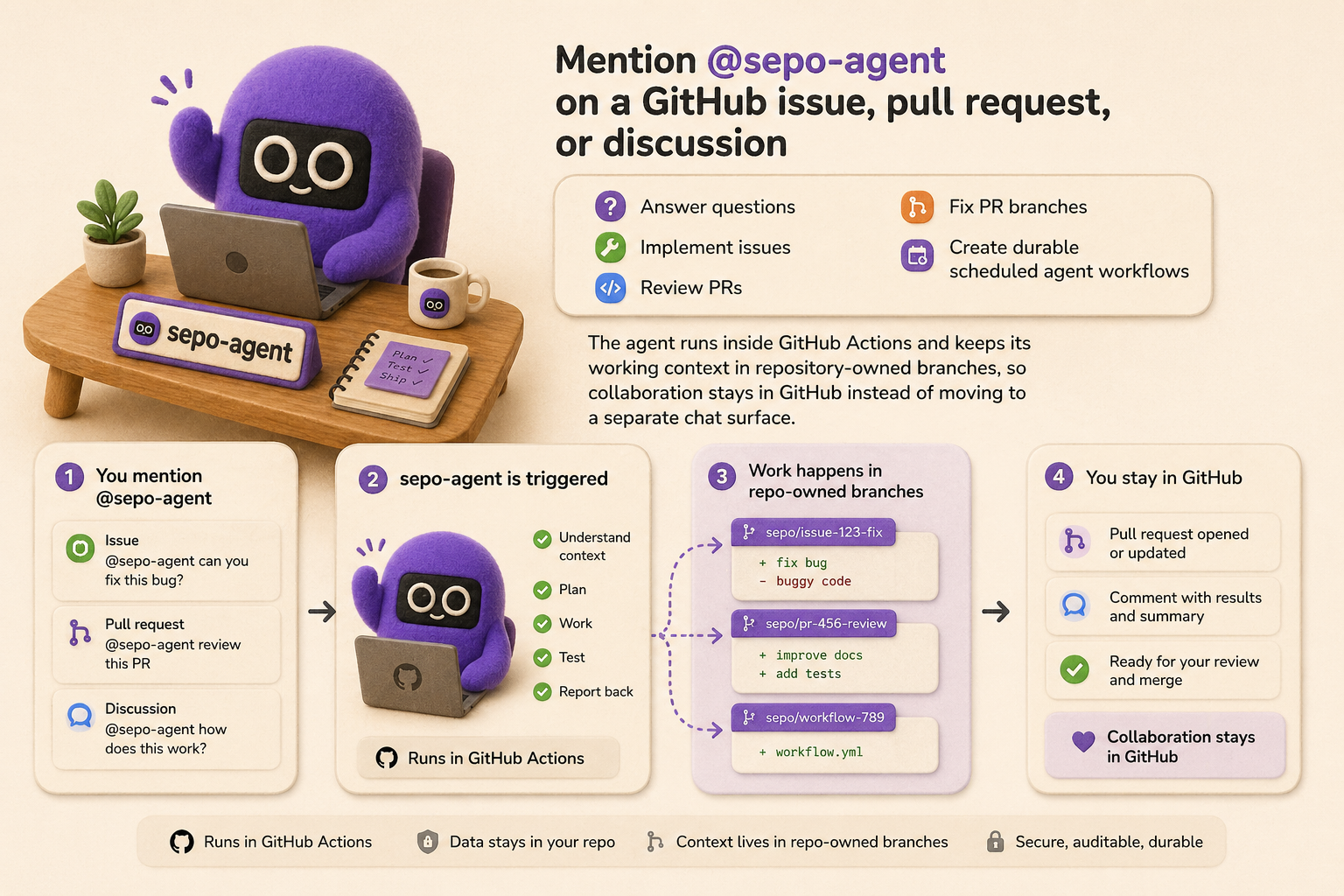
Mention @sepo-agent on a GitHub issue, pull request, or discussion to answer questions, implement issues, review PRs, fix PR branches, or create durable scheduled agent workflows. Sepo runs inside GitHub Actions and keeps working context in repository-owned branches, so collaboration stays in GitHub instead of moving to a separate chat surface.
Sepo turns a repository into a self-evolving repository: a codebase that can react to user requests, preserve agent-facing memory and user/team rubrics, and improve both application code and its own automation over time. For the concept behind that architecture, see What is a self-evolving repository?.
Quick Start
Start from this template
- Create a new repository with Use this template.
- Install the Sepo GitHub App. For first-time setup, select only the repository you are setting up.
- Before onboarding, confirm the repository is ready:
- Issues are enabled in
Settings > General > Features > Issues. - Actions are enabled in
Settings > Actions > General. - The Sepo GitHub App is installed for this repository.
- At least one model-provider credential is configured under
Settings > Secrets and variables > Actionsas a repository secret:OPENAI_API_KEYfor Codex-backed runs, orCLAUDE_CODE_OAUTH_TOKEN/ANTHROPIC_API_KEYfor Claude-backed runs.
- Issues are enabled in
- Run
Agent / Onboarding / Check Setupfrom GitHub Actions. It creates the built-inagent/*trigger labels if they are missing and opens or updates an agent-trackedSepo setup checkissue with configuration status and copyable test commands. - Open an issue and mention
@sepo-agentin the issue body or a comment. After a short delay, the workflow should add an eyes reaction and then post a response.
Install into an existing repository
Check Install into an existing repository for the detailed guide.
- Public repositories: the quickest path is to open the Install Sepo into another repository issue form in
self-evolving/repoand paste the target URL. - Private repositories: run an agent locally, give it access to this source checkout and the private target repository, and ask it to use the
.skills/install-agentskill so private access stays in your trusted environment.
What You Can Ask It To Do
In any GitHub text input (issues, PRs, discussions), call the agent to execute tasks
# Use a free-form mention when you want the router to infer the best route:
@sepo-agent can you explain how review synthesis works?

# Use an explicit slash route when you already know the action
@sepo-agent /implement implement issue #2

# Invoke arbitrary skills
@sepo-agent /skill <skill-name>

# Public repo: open the "Install Sepo into another repository" issue form,
# or ask for the install PR directly when Sepo can write to the repo
@sepo-agent /install can you install Sepo into https://github.com/owner/repo?

# Private repo: run a local/trusted agent session with the install-agent skill

# Inside a PR
@sepo-agent /review
@sepo-agent /fix-pr
@sepo-agent /orchestrate
WARNING
Only authorized repository users can trigger Sepo. By default, repositories allow
OWNER,MEMBER,COLLABORATOR, andCONTRIBUTORassociations; public repositories can tighten this withAGENT_ACCESS_POLICY. See Trigger access policy to customize that behavior.
You can also trigger the same built-in routes by adding agent/* labels to PRs
For example, adding the agent/review label will run the review agent. The Agent / Onboarding / Check Setup workflow creates the built-in trigger labels on first run.
Task Orchestration Route
Use @sepo-agent /orchestrate (or agent/orchestrate) to run the orchestration route explicitly. It checks current target state, dispatches the right built-in action (implement, review, or fix-pr), and keeps that explicitly started chain moving through bounded follow-up handoffs until a stop condition is reached. Direct /implement, /review, and /fix-pr requests remain one-shot.
Tracking Workspace Memory and Rubrics
Sepo persists long-lived context in agent/memory and preference rules in agent/rubrics, both as repository-owned branches. This lets later runs resume with durable project context and team-specific guidance.
Scheduled Jobs
You can run Sepo on a schedule to handle recurring maintenance, triage, or monitoring tasks without a manual mention. For example, agent-daily-summary.yml can publish a daily repository activity summary discussion when enabled, and agent-update.yml checks near-biweekly for Sepo agent infrastructure updates from the latest stable release tag. The packaged daily summary cron is disabled by default, while manual dispatch remains available. Manual update runs can pass source_ref to test main, a branch, or a specific tag; if no release exists yet, the workflow falls back to main and records that in the run summary. If an update PR is already open, later runs update that PR instead of opening a duplicate. Set AGENT_AUTO_UPDATE=false to disable the scheduled update check, or set AGENT_ENABLED=false to pause all Sepo agent workflows. Scheduled workflows still route through the same policy and memory layers, so they behave consistently with on-demand runs.
How It Works
Every trigger converges on agent-router.yml, which extracts GitHub context, applies access policy, optionally triages free-form requests with a model, and dispatches to a specialized route. Agent sessions are persisted across runs with git refs and GitHub Actions artifacts, so a later mention can continue from prior context.
Durable context lives in two repository-owned branches:
agent/memorymirrors GitHub artifacts and stores curated project context.agent/rubricsstores user/team preferences that guide implementation and review.
Orchestration runs through agent-orchestrator.yml as an explicit route. Follow-up automation starts only when requested, and only workflows launched with explicit orchestration context hand back to the orchestrator.
Learn More
Getting started:
- What is a self-evolving repository?
- Quick start
- Setup guide
- Install into an existing repository
- Self-hosted GitHub Action runner
- Using your own GitHub App
Understanding the system:
- Overall design
- Supported workflows
- The life cycle of an agent request
- Repository goals
- Repository memory
- team rubrics
Using Sepo:
Customizing and operating:
Technical details: